![Type=Full, Color=Light, Lockup=Default@2x.png]](https://info.tractionag.com/hs-fs/hubfs/Type=Full%2c%20Color=Light%2c%20Lockup=Default@2x.png?height=32&name=Type=Full%2c%20Color=Light%2c%20Lockup=Default@2x.png)
Overview
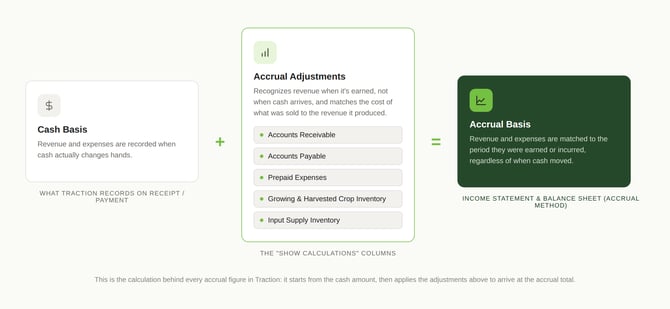
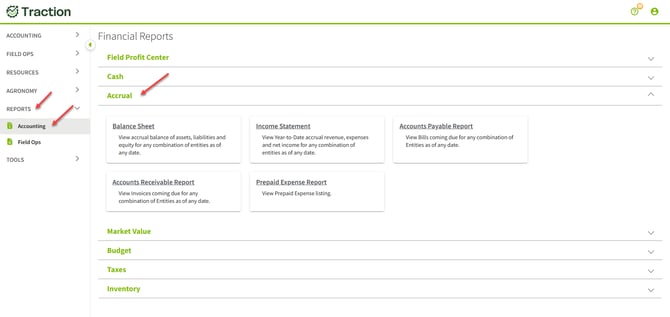
Traction's accrual basis financial reports give you a complete picture of your farm's financial performance by matching revenue and expenses to the period in which they were earned or incurred, regardless of when cash actually changed hands. The reports are found under Reports > Accounting > Accrual and include:
-
Income Statement (Accrual Method)
- Balance Sheet (Accrual Method)
Both reports can be run for any combination of entities. All selected entities must share the same fiscal year-end date.
You will need a Pro subscription to access the Accrual Method Income Statement report and the Accrual Method Balance Sheet report. Visit our plans and pricing page to learn more.
- What is accrual accounting?
- Before you start
- Balance Sheet (Accrual Method)
- Current Portion of Long-Term Debt
- Harvested Crop Inventory
- Growing Crop Inventory
- Recording a Manual Accrual Adjustment
- FAQ
What is accrual accounting?
Cash basis vs. accrual basis
A cash basis report counts income and expenses on the day money moves. An accrual basis report counts them in the year they belong to, whether or not the money has moved yet.
Here is a simple farm example. You deliver corn to the elevator on December 20, but the check arrives on January 10.
|
|
Cash basis |
Accrual basis |
|
Which year shows the income? |
The new year (January 10) |
The year you delivered (December 20) |
The same idea applies to the rest of your year:
- Bills you have not paid yet. The seed was used this year, so the cost belongs to this year even if the invoice is paid next month.
- Inputs bought early. Fertilizer you paid for in November for next year's crop is a cost of next year, not this year.
- Grain in the bin. Corn you harvested but have not sold has value, and accrual reports count it.
- Crops still in the field. The money you have spent growing a crop is held as an asset until the crop is harvested.
Why use accrual reports?
Cash basis reports record income and expenses when money changes hands, so the timing of payments can distort a year’s results. Accrual reports match income and expenses to the year they were earned or incurred, which gives a more accurate measure of your farm’s profitability and financial position. Lenders and other financial professionals commonly ask for accrual-adjusted statements for this reason.
Before you start
Check these four things first so the reports show what you expect.
- Same year-end. All entities you select must share the same fiscal year-end date. If they do not, the report will not display and you will see an error.
- Loan details entered. Each Notes Payable - Long Term account in your Chart of Accounts needs its loan details (balance, interest rate, payment frequency, remaining term). Without them, the Current Portion of Long-Term Debt cannot be calculated.
- Field records complete. Crop inventory costs come from your Field Profit Center Statement. Missing inputs or equipment passes will understate the cost.
- Transactions entered through your As of Date. Accrual reports use your open invoices, bills and inventory records, so enter these before you run the report.
Accessing the Reports
Navigate to Reports > Accounting in the left sidebar. Under the Accrual section, select Income Statement or Balance Sheet.
Report Controls
Each accrual report shares the same set of controls at the top of the screen.
|
Control |
Description |
|
Entities |
Select one or more entities to include. All selected entities must share the same fiscal year-end date. The report header will display all selected entity names. |
|
As of Date |
Sets the end date for the report. The Income Statement covers the first day of the fiscal year (typically January 1) through this date. The Balance Sheet reflects balances as of this date. |
|
Show Calculations |
Toggles the calculation view, which adds columns showing how each accrual figure is derived from the cash basis. See the Show Calculations section for details. |
|
Report Options (gear icon) |
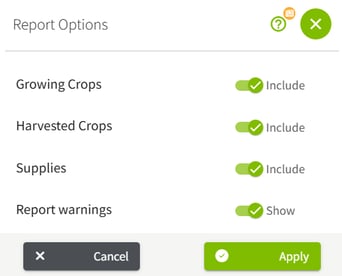
Opens additional display options including whether to include Growing Crops, Harvested Crops, and Supplies in the report, and whether to show report warnings. |
Note: All selected entities must share the same fiscal year-end date. If entity year-end dates do not match, you will be unable to display the report and will see an error.

Report Options (gear icon)
Income Statement (Accrual Method)
The Accrual Income Statement shows year-to-date revenue, expenses, and net income for the selected entities, adjusted from the cash basis to reflect accrual accounting principles.
What the Report Shows
Without Show Calculations enabled, the report displays a clean summary with a single Total column. Rows are organized into:
- Revenue accounts with accrual-adjusted totals
- Total Revenue
- Expense accounts with accrual-adjusted totals
- Total Expenses
- Net Income
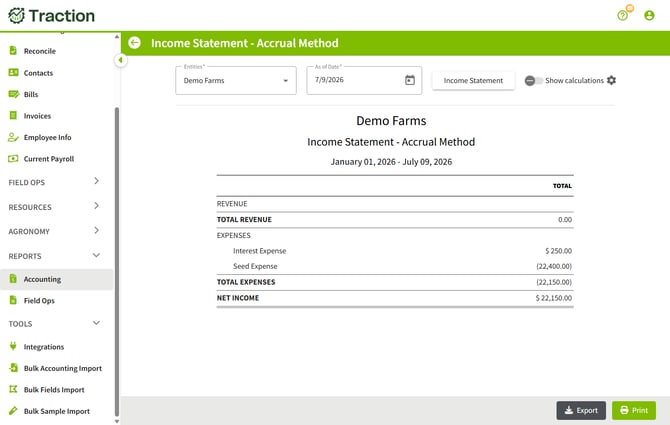
With Show Calculations enabled, you will be able to drill into the values to see more detail and this is where you can make adjustments for Crop Inventory and Growing Crop Inventory. Please Note that any adjustments to the Crop Inventory and the Growing Crop Inventory will change the balances on the Accrual Income Statement and the Accrual Balance Sheet.
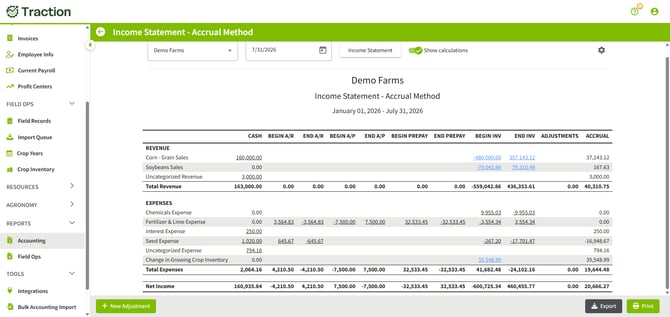
How Accrual Revenue and Expenses Are Calculated
Traction calculates each accrual line by starting with the cash amount recorded in the fiscal year and then adjusting for:
|
Adjustment |
Effect on the Accrual Figure |
|
Beginning Accounts Receivable (Begin A/R) |
Receivables that were open at the start of the year are removed. Revenue collected this year (shown in the Cash column) that was earned last year does not count toward this year's accrual income. |
|
Ending Accounts Receivable (End A/R) |
Receivables open at the end of the period are added. Revenue earned but not yet collected is recognized in the current period. |
|
Beginning Accounts Payable (Begin A/P) |
Payables that were open at the start of the year are removed. Expenses paid this year (shown in the Cash column) that were incurred last year do not count toward this year's accrual expenses. |
|
Ending Accounts Payable (End A/P) |
Payables open at the end of the period are added. Expenses incurred but not yet paid are recognized in the current period. |
|
Beginning Prepaid Expenses (Begin Prepay) |
Prepaid balances from the start of the year are added to accrual expenses. Cash was paid in a prior period for costs that apply to this year, so those costs are recognized as an expense in the current period. |
|
Ending Prepaid Expenses (End Prepay) |
Ending prepaid balances are subtracted from accrual expenses. Cash paid this year (shown in the Cash column) that covers costs in a future period is deferred and removed from the current period's expenses. |
|
Beginning Harvested Crop Inventory (Begin Inv — Revenue) |
Harvested crop inventory is treated as a sale. Beginning harvested crop inventory is subtracted from revenue because those bushels were on hand at the start of the year and would have been sold and reflected in either Cash or Accounts Receivable during the period. |
|
Ending Harvested Crop Inventory (End Inv — Revenue) |
Ending harvested crop inventory is added to revenue. Crops that have been harvested but not yet sold represent revenue earned in the period that has not yet been received as cash. |
|
Beginning Input Inventory (Begin Inv — Expenses) |
Beginning input inventory (seed, chemicals, and other supplies on hand at the start of the year) increases accrual expenses. Those inputs were purchased in a prior period but will be consumed as an expense in the current period. |
|
Ending Input Inventory (End Inv — Expenses) |
Ending input inventory decreases accrual expenses. Inputs purchased this year that are still on hand have not yet been consumed, so their cost is deferred out of the current period's expenses. |
Balance Sheet (Accrual Method)
The Accrual Balance Sheet shows assets, liabilities, and equity for the selected entities as of the chosen date.
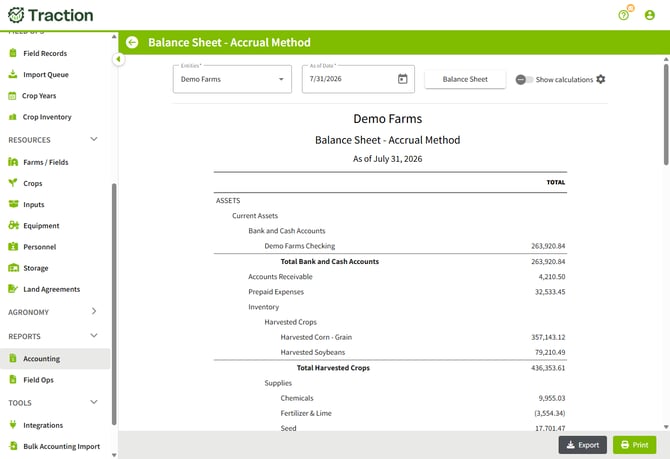
The Balance Sheet is organized into the standard asset, liability, and equity sections. The sections that appear depend on your chart of accounts and what has been set up for your entities:
- Assets: Current Assets (Bank and Cash Accounts, Accounts Receivable, Prepaid Expenses, Inventory including Supplies, Growing Crops, and Harvested Crops, and Other Current Assets); Property and Equipment; and Long-Term Assets
- Liabilities: Current Liabilities (including Accounts Payable) and Long-Term Liabilities
- Equity: Owners' Equity accounts, Retained Earnings, Opening Balance Equity, and Net Income
Supporting Schedule
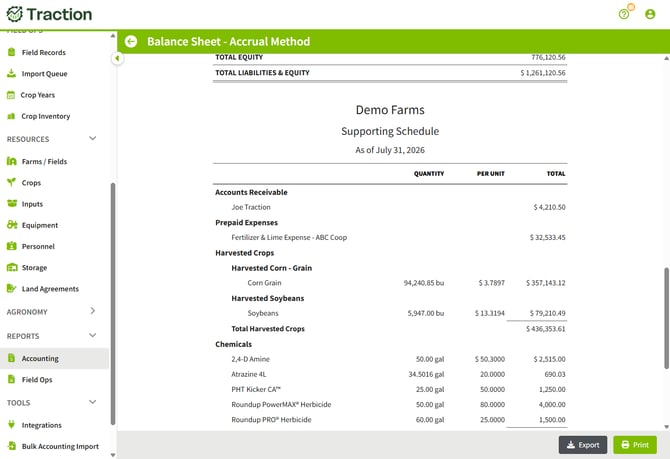
Below the main Balance Sheet, a Supporting Schedule provides line-by-line detail for the accrual accounts whose balances are derived from transactions and inventory records rather than entered directly. This includes:
- Accounts Receivable: broken out by customer
- Prepaid Expenses: broken out by vendor and expense category
- Input Inventory (Supplies): seed, chemicals, and other supply inputs shown with quantity, per-unit value, and total for each lot
- Growing Crop Inventory: each active crop shown with number of acres and unit cost per acre
- Harvested Crop Inventory: each crop shown with number of bushels, unit cost per bushel, and total value
- Accounts Payable: broken out by vendor
The gear icon opens Report Options. These settings control what is included on both the Balance Sheet and the Income Statement. Turning off an inventory type removes it from the Balance Sheet as an asset and also removes the corresponding accrual adjustments from the Income Statement.
|
Option |
Effect When Included / Effect When Excluded |
|
Growing Crops |
Included: Growing Crop Inventory appears as an asset on the Balance Sheet. Change in Growing Crop Inventory (beginning and ending growing crop values) appears as a line on the Income Statement. Excluded: Growing Crop Inventory is removed from the Balance Sheet. The Change in Growing Crop Inventory line does not appear on the Income Statement. |
|
Harvested Crops |
Included: Harvested Crop Inventory appears as an asset on the Balance Sheet. The beginning and ending harvested crop inventory adjustments are applied to crop sales accounts on the Income Statement. Excluded: Harvested Crop Inventory is removed from the Balance Sheet. The beginning and ending inventory adjustments to crop sales revenue are not applied on the Income Statement. |
|
Supplies |
Included: Input inventory (seed, chemicals, and other supplies) appears as an asset on the Balance Sheet. Beginning and ending supply inventory adjustments are applied to the corresponding input expense accounts on the Income Statement. Excluded: Supply inventory is removed from the Balance Sheet. The beginning and ending inventory adjustments to input expenses are not applied on the Income Statement. |
|
Report Warnings |
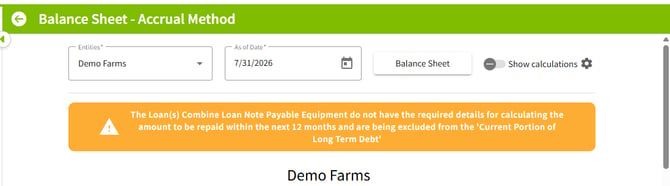
Included: Warnings are displayed where Traction detects data that may affect report accuracy. This includes missing loan details on Notes Payable - Long Term accounts that prevent an accurate calculation of the Current Portion of Long-Term Debt. See the Current Portion of Long-Term Debt section for more detail. Excluded: Warnings are hidden. |
Current Portion of Long-Term Debt
The Accrual Balance Sheet automatically calculates and displays the Current Portion of Long-Term Debt. This figure represents the principal amount due on all loans over the next twelve months and is a standard component of an accrual balance sheet.
How It Is CalculatedFor each Notes Payable account that has been set up as a long-term liability in the Chart of Accounts, Traction uses the loan details entered on that account to project the principal payments due in the next twelve months. The loan details include the outstanding balance, interest rate, payment schedule, and loan term.
The resulting Current Portion of Long-Term Debt is then split across two balance sheet lines:
- The amount is subtracted from the Notes Payable - Long Term balance, reducing the long-term liability to reflect only the portion not due within the next year.
- The same amount is added to Notes Payable - Short Term (Current Liabilities), reflecting the portion of principal that is expected to be paid within twelve months.
Loan Details Required
The calculation depends on complete loan details being entered for each Notes Payable - Long Term account in the Chart of Accounts. If loan details are missing or incomplete for any account, Traction cannot accurately project the current portion for that loan. When Report Warnings is enabled, a warning will appear on the report identifying which accounts are missing the information needed for this calculation.
Note: To ensure the Current Portion of Long-Term Debt is calculated correctly, verify that loan details (outstanding balance, interest rate, payment frequency, and remaining term) are entered for each Notes Payable - Long Term account in the Chart of Accounts.
Show Calculations
Both the Income Statement and Balance Sheet include a Show Calculations toggle. When enabled, the report expands to show how each accrual figure is derived from the underlying cash basis data.
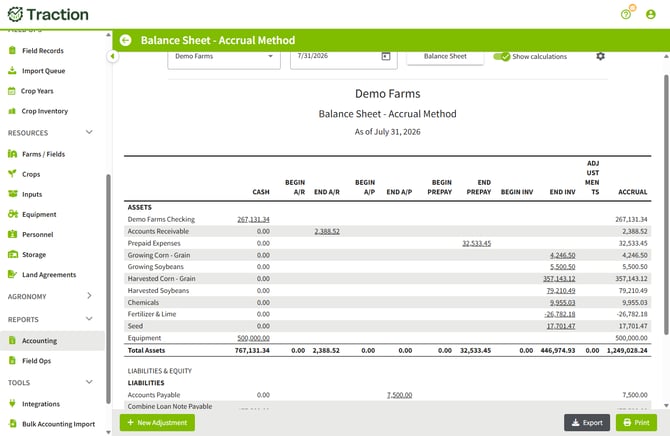
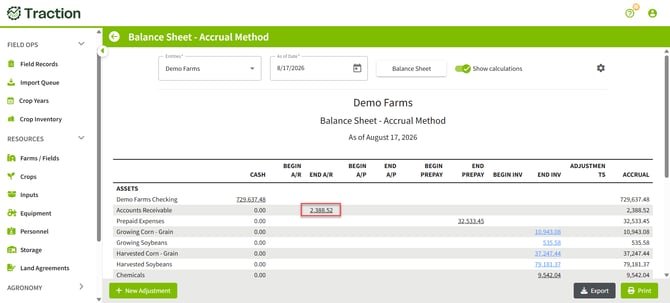
For Example, to determine the details for the $2,388.52 amount in Accounts Receivable, click on the underlined value to see more information.
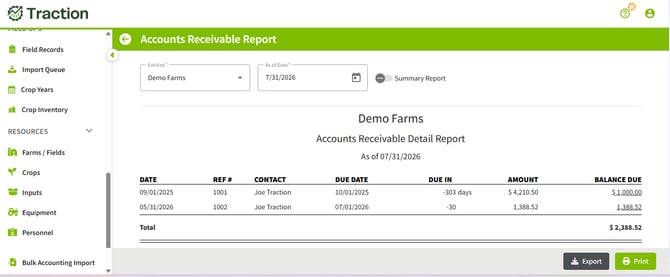
How It Works
With Show Calculations on, each row in the report displays separate columns instead of a single Total. Each column represents one component of the accrual adjustment formula:
|
Column |
What It Represents |
|
Cash |
The amount recorded on a cash basis in the period. This matches what would appear on the cash basis Income Statement or Balance Sheet. |
|
Begin A/R |
Beginning accounts receivable balance for the account row. Subtracted from cash revenue to remove prior-year receivables collected this year (shown in the Cash column). |
|
End A/R |
Ending accounts receivable balance. Added to recognize revenue earned but not yet collected. |
|
Begin A/P |
Beginning accounts payable balance. Subtracted from cash expenses to remove prior-year payables paid this year (shown in the Cash column). |
|
End A/P |
Ending accounts payable balance. Added to recognize expenses incurred but not yet paid. |
|
Begin Prepay |
Beginning prepaid expense balance. Added to accrual expenses because cash was paid in a prior period for costs that apply to the current period. |
|
End Prepay |
Ending prepaid expense balance. Subtracted from accrual expenses because cash paid this year (shown in the Cash column) covers costs in a future period. |
|
Begin Inv (Harvested Crop — Revenue) |
Beginning harvested crop inventory. Subtracted from revenue because those bushels were on hand at the start of the year and would be reflected in Cash or Accounts Receivable when sold. |
|
End Inv (Harvested Crop — Revenue) |
Ending harvested crop inventory. Added to revenue because harvested but unsold crops represent revenue earned in the period not yet received as cash. |
|
Begin Inv (Input Supplies — Expenses) |
Beginning input inventory (seed, chemicals, and other supplies). Added to accrual expenses because those inputs were purchased in a prior period but are consumed as expense in the current period. |
|
End Inv (Input Supplies — Expenses) |
Ending input inventory. Subtracted from accrual expenses because inputs purchased this year that are still on hand have not yet been consumed. |
Note: Underlined values in the calculation columns are clickable. Clicking a value opens the detail behind that figure. See the Drill-Down Detail section below for what each link opens.
Drill-Down DetailThroughout the accrual reports, underlined values are interactive. Clicking a value opens a detail view showing the transactions or records that make up that balance. The destination varies by column:
|
Underlined Value |
Drill-Down Destination |
|
Begin A/R |
Opens the Accounts Receivable Report as of the beginning of the fiscal year, showing the open receivables that were carried into the current period. |
|
End A/R |
Opens the Accounts Receivable Report as of the As of Date, showing receivables currently open. |
|
Begin A/P |
Opens the Accounts Payable Report as of the beginning of the fiscal year, showing the open payables carried into the current period. |
|
End A/P |
Opens the Accounts Payable Report as of the As of Date, showing payables currently open. |
|
Cash amounts |
Opens the underlying transaction detail for that account and period. |
|
Harvested Crop Inventory (Income Statement or Balance Sheet) |
Opens the Harvested Crop Inventory detail. See the Harvested Crop Inventory section below. |
Harvested Crop Inventory
Drilling down on a crop sales account on the Income Statement, or on the Harvested Crop Inventory account on the Balance Sheet, opens the Harvested Crop Inventory detail view.
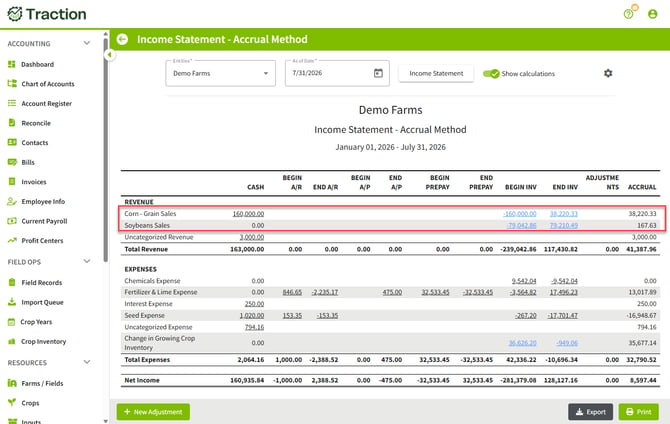
What the Detail View Shows
The detail view lists each crop in inventory as of the selected date, organized by crop year and name (for example, 2025 Corn). For each entry, it shows:
- Crop year and name
- Number of bushels on hand (underlined and clickable — clicking opens a Harvested Crop Inventory report as of that date showing the detail behind the bushel count)
- Unit cost per bushel
- Total inventory cost
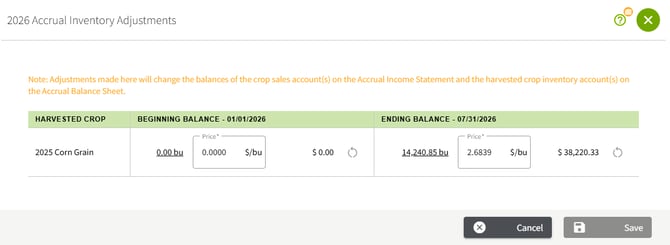
Unit Cost: Cost of Production
The default unit cost is the cost of production for the crop. This figure comes from the Field Profit Center Statement for all fields where that crop was harvested. It takes into account inputs (seed, chemicals, fertilizer), equipment costs, land costs, and other expenses allocated to those fields and that crop year.
Note: Because the unit cost is derived from the Field Profit Center, it is only as accurate as the field records and cost allocations that have been entered. Incomplete records will produce an understated cost.
Expected Sales ValueYou can change the unit cost to an Expected Sales Value by manually entering a per-bushel value in the detail view. The Expected Sales Value is an estimate of what you will ultimately receive for the crop. This value typically includes:
- The contracted price for any bushels already sold under a contract
- A current market price that you would receive if you sold the remaining uncontracted bushels on that date
To enter an Expected Sales Value, click on the unit cost field for the crop in the Harvested Crop Inventory detail view and type in the value. Traction does not calculate this number automatically — you supply the estimate based on your contracts and current market conditions.
Using Expected Sales Value in place of cost of production changes the inventory cost on both the Balance Sheet (Harvested Crop Inventory asset balance) and the Income Statement (through the inventory adjustment columns). This gives a market-based view of inventory on the Balance Sheet and reflects crop sales as though the crop was sold at that value.
Note: Switching between cost of production and Expected Sales Value only affects the accrual reports. It does not change any posted transactions or cash basis records.
Resetting to Cost of Production
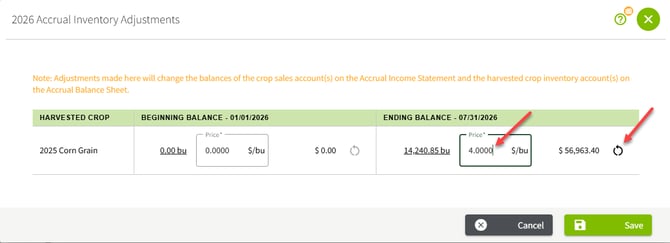
If you have manually entered a unit cost and want to return to the calculated cost of production, a Reset button is available in the Harvested Crop Inventory detail view. Clicking Reset clears the manually entered value and restores the unit cost to the figure calculated from the Field Profit Center Statement.
In the example screenshot below, an adjustment was made to the Ending Balance price of $4.00/ bu, when that change occurred, the Reset button became active (highlighted by the arrow on the right). Clicking on the reset button will restore the unit cost to the cost that was earlier listed.
When you set a unit cost for harvested crop inventory on a report, that value is saved and carried forward. Specifically:
- The unit cost you enter for a crop on a given report becomes the beginning inventory value for the same crop on the following year's report.
- For example, if you set a unit cost of $4.00 per bushel for 2025 Corn on an accrual report for the period 1/1/2025 through 12/31/2025, that same $4.00 will be used as the beginning inventory cost for 2025 Corn when you run the 2026 report.
This also means that changing a beginning inventory value on the current year's report will update the ending value that was used on the prior year's report, keeping the two periods consistent.
Growing Crop Inventory
The Accrual Income Statement includes a line for Change in Growing Crop Inventory. The Accrual Balance Sheet includes a Growing Crop Inventory asset. Both reflect the cost of crops that have been planted but not yet harvested as of the report date.
What Growing Crop Inventory Represents
Growing crop inventory captures the accumulated cost of in-progress crops at a point in time. When you have planted a crop but have not yet harvested it, you have invested real costs (seed, tillage, herbicide, planting labor, and so on) that have not yet produced any revenue. Accrual accounting recognizes those costs as an asset rather than as an immediate expense.
How the Cost Is Calculated
The growing crop inventory cost comes from the Field Profit Center Statement. Traction looks at each field that has a crop that has not been harvested and aggregates the costs that have been allocated to that field and crop through the report date. This includes:
- Input costs (seed, chemicals, fertilizer, and other inputs applied to the field)
- Equipment costs allocated to field operations
- Other costs allocated to the field or crop
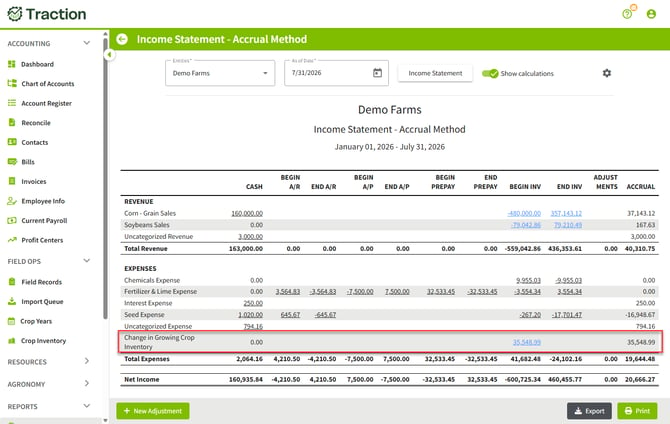
Change in Growing Crop Inventory on the Income Statement
The Income Statement shows Change in Growing Crop Inventory as a separate line. This represents the net change between the beginning and ending growing crop inventory balances for the period. Because growing crop inventory offsets expense accounts (it is essentially pulling costs such as Seed Expense and Rent Expense out of expenses and placing them in inventory), the ending value appears as a negative number — it is reducing the total expenses to reflect that those costs are now held as an asset rather than recognized as current-period expenses.
- If ending growing crop inventory is higher than beginning (more costs have accumulated in the field), the change reduces total expenses further, increasing accrual net income.
- If ending growing crop inventory is lower than beginning (crops were harvested and moved to harvested inventory), the change adds back to expenses, decreasing accrual net income.
Growing Crop Inventory on the Balance Sheet
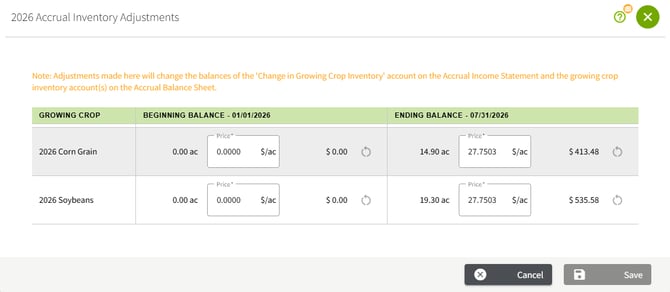
The ending growing crop inventory cost is reflected on the Accrual Balance Sheet as a Growing Crop Inventory asset. The balance sheet displays each active crop and crop year with the number of acres and the unit cost per acre.
Note: To see the underlying costs for Growing Crop Inventory Balance, review the Field Profit Center Statement for the relevant fields and crop year.
Adjusting the Unit CostIf the unit cost per acre appears incorrect, you can change it directly in the detail view. Incorrect unit costs are most commonly caused by incomplete field records: if not all inputs, equipment passes, or other costs have been entered for a field, the accumulated cost will be understated.
Before adjusting the unit cost manually, review the Field Profit Center Statement for the affected fields to identify any missing cost entries. Updating the underlying records is preferable to a manual override because it keeps your field records and financial reports consistent.
Click on the underlined value for the Growing Crops Inventory, this will open up a dialog box of 2026 Accrual Inventory Adjustments box for you to enter any necessary changes to Beginning Balance or Ending Balance.
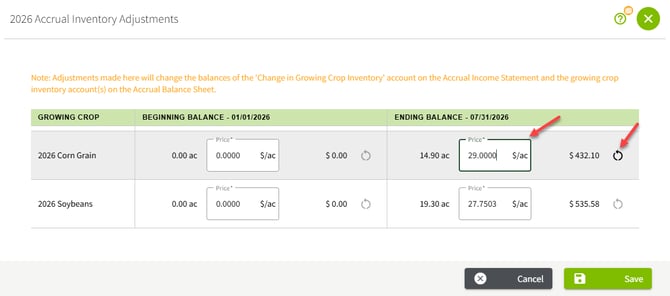
If you have manually entered a unit cost and want to return to the calculated value, a Reset button is available in the detail view. Clicking Reset clears the manually entered value and restores the unit cost to the figure calculated from the Field Profit Center Statement. In the example screenshot below, as an example, the Ending Balance for 2026 Corn Grain has been adjusted to $29.00 price/acre, and the Reset button is now active to reset back to the original amount.
Note: Manual unit cost changes affect only the accrual reports. They do not modify any field records, Field Profit Center Report or Market Value Balance Sheet.
Exporting and Printing
Both reports include Export and Print buttons in the bottom-right corner of the screen.
- Export downloads the report as a CSV file into the downloads folder. The CSV file can be opened in a spreadsheet program. The exported file includes all columns visible on screen, including calculation columns if Show Calculations is enabled.
- Print opens a print-ready view of the report formatted for the selected paper size. This can also be saved as a PDF by choosing PDF in your printer options.
Recording a Manual Accrual Adjustment
Some common reasons to record a manual accrual adjustment:
- You want to accrue expenses or revenue that haven't been billed yet. For example, accruing a liability with an offsetting expense for the calculated value of interest owed on loans as of your financial statement date.
- You need to change the value in an accrual-level account (such as Accounts Receivable, Accounts Payable, or Inventory) but don't have time to fix the underlying detail in Traction, such as an invoice entered with the wrong amount, or an inventory value that hasn't caught up yet. Rather than tracking down and fixing the source of the error right away, you can record an adjustment that corrects the total on the report now, then go back and fix the real problem later.
Note: Accrual adjustments require accounting knowledge
Manual accrual adjustments affect your farm’s financial statements, so it’s important to understand which accounts should be adjusted and why. If you’re not sure what adjustment is needed, we recommend working with your accountant or other accounting professional to determine the appropriate accounts and amounts.
Not sure what to enter? Your accountant can provide the accounts and amounts needed for the adjustment. Once you have that information, Traction provides the tools to enter and record the adjustment. Traction can help you record the entry, but it does not determine what adjustment your farm needs or which accounts should be used.
With Show Calculations enabled, a + New Adjustment button appears below the report. Clicking it opens the New Accrual Journal Entry screen.
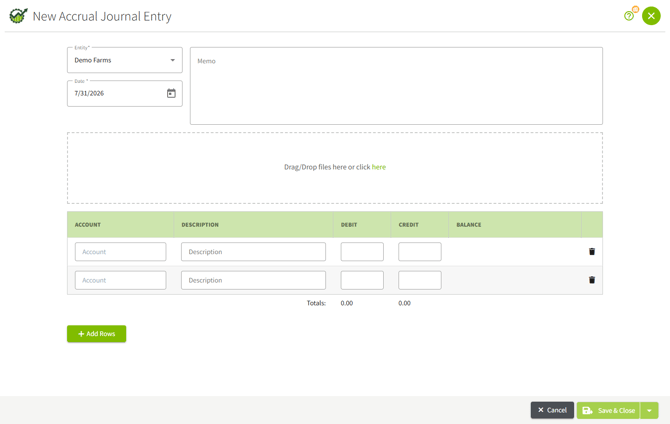
|
Field |
Description |
|
Entity |
The entity the adjustment applies to. If your report combines multiple entities, choose the specific entity this entry belongs to. |
|
Date |
The date the adjustment is recorded. Defaults to the report's As of Date. |
|
Memo |
A free-text note describing the reason for the adjustment. |
|
Attachments |
Optional supporting documentation you can attach to the entry. |
|
Account / Description / Debit / Credit |
One row per line of the journal entry. Add as many rows as the entry needs with + Add Rows. |
|
Totals |
Running totals of all debits and credits entered. Traction will not let you save the entry until these two totals are equal. |
Example: Recording Accrued Interest on a Loan
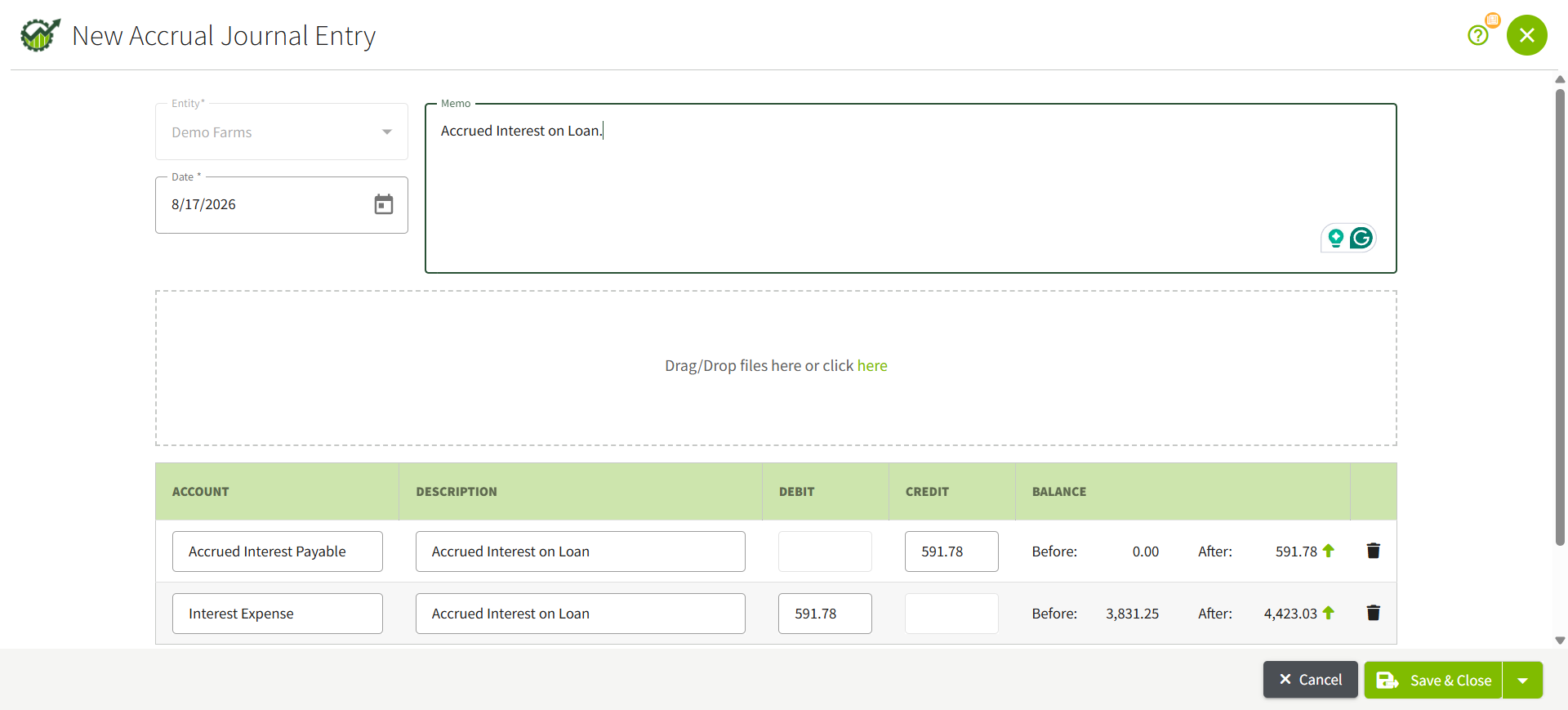
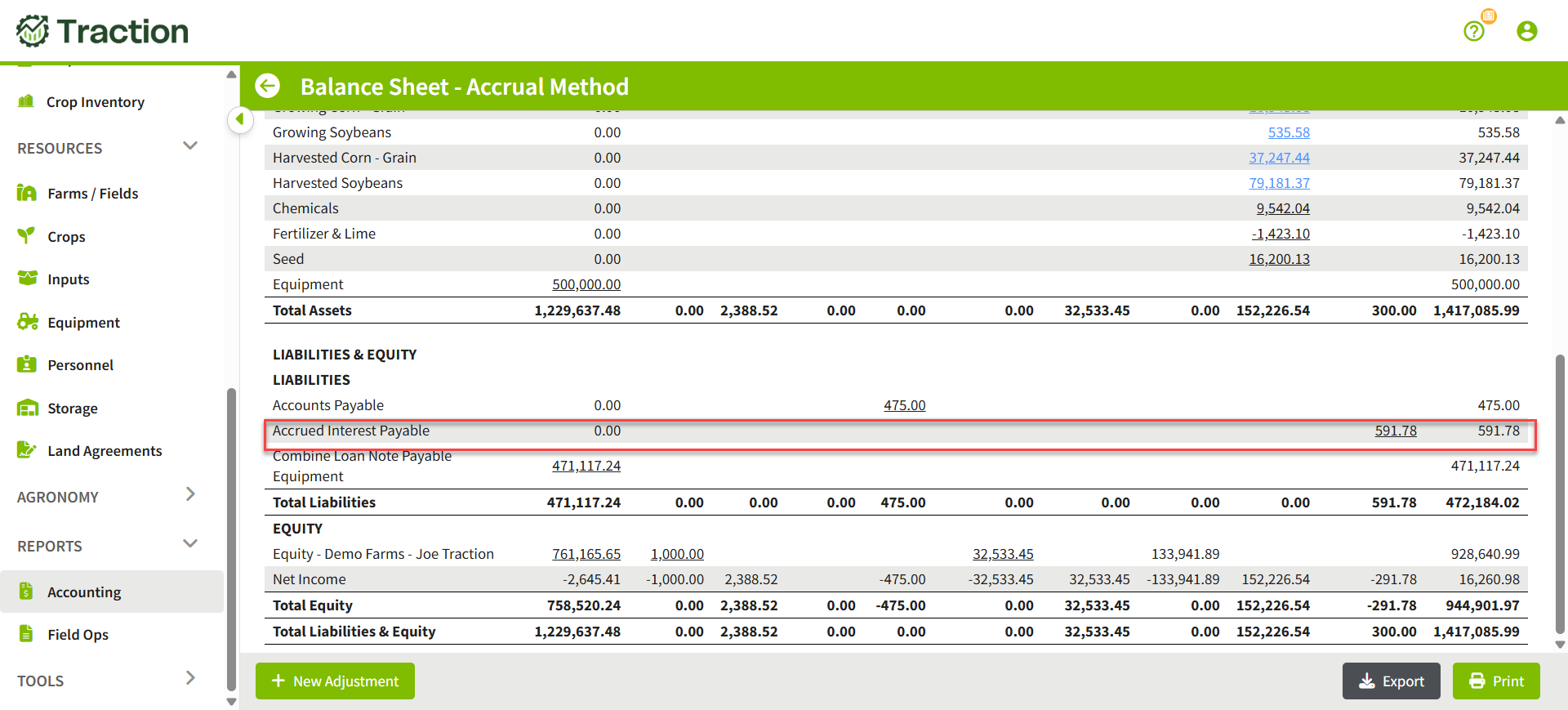
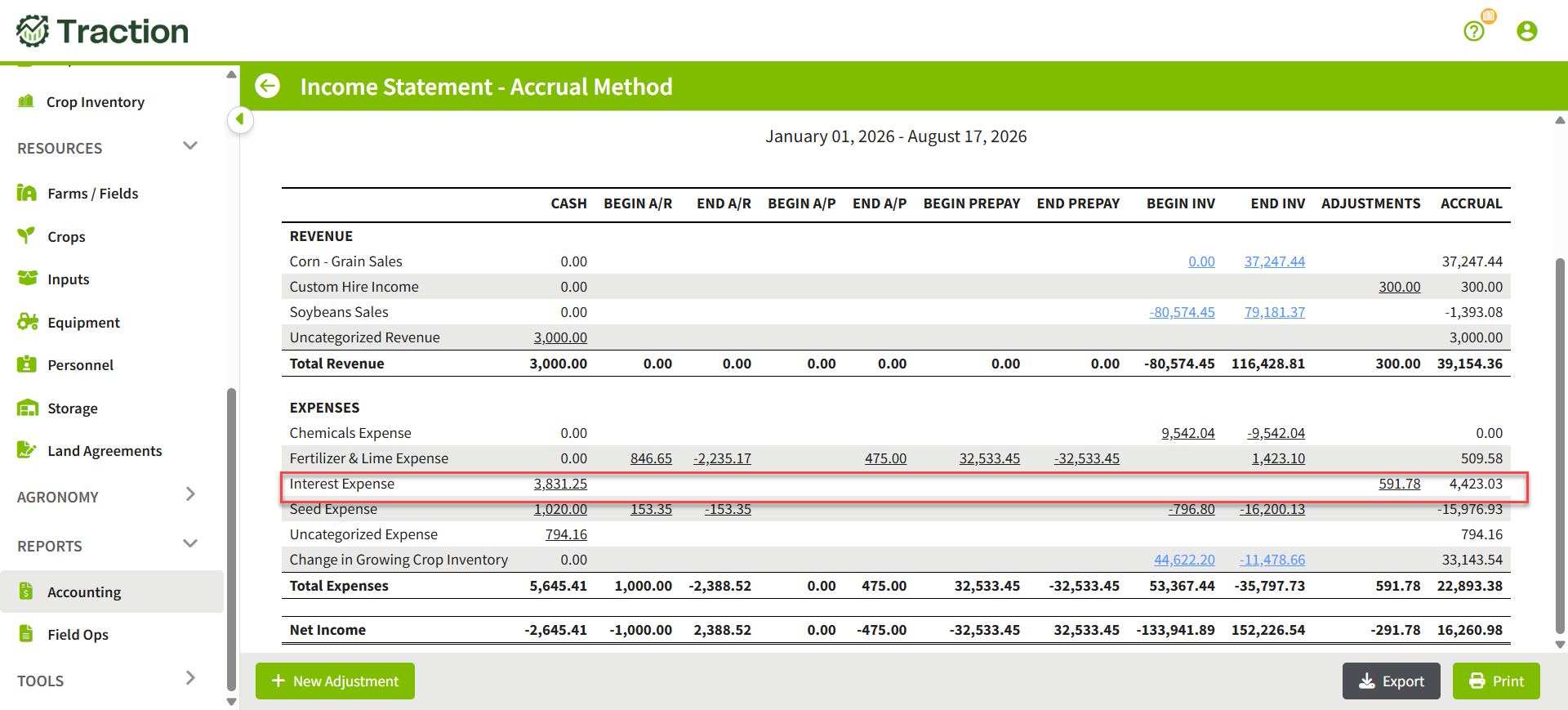
Why make this adjustment: Interest builds up on a loan every day, but you may only pay it once or twice a year. If your year-end falls between payments, the interest you owe is not on your reports yet. An accrual adjustment adds it as an expense for the year it was incurred, and as an amount you owe on the Balance Sheet.
Debit: Interest Expense $591.78
Credit: Accrued Interest Payable $591.78
What the Accrual Balance Sheet will show.
What the Accrual Income Statement will show.
Example: Correcting a Wrong Balance
A manual adjustment changes the total shown on the accrual report for the account(s) you choose. It does not fix whatever caused that number to be wrong in the first place. For example, if your Accounts Receivable balance is off because an invoice was entered with the wrong amount, a manual adjustment can correct the Accounts Receivable total on the Balance Sheet right now, but the invoice itself is still wrong, and the detail behind that total (the Supporting Schedule, the Accounts Receivable Report) will still show the original, incorrect invoice.
Note: A manual accrual adjustment only affects the accrual reports. It has no effect on the Cash column, cash-basis reports, Market Value Balance Sheet, or any transactions elsewhere in Traction.
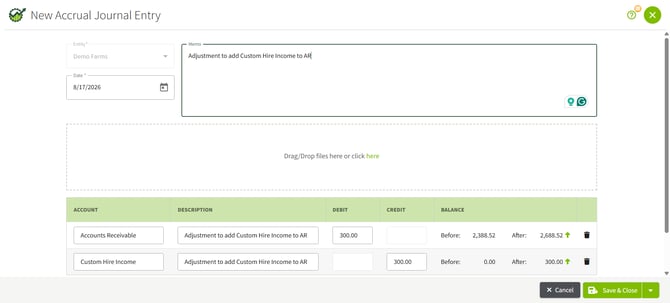
The following example is an adjustment to Accounts Receivable for some Custom Hire Income that was not recorded in error on an invoice.
Original Accrual report with Accounts Receivable amount of $2338.52.
Adjustment to correct the Accrual Balance Sheet total.
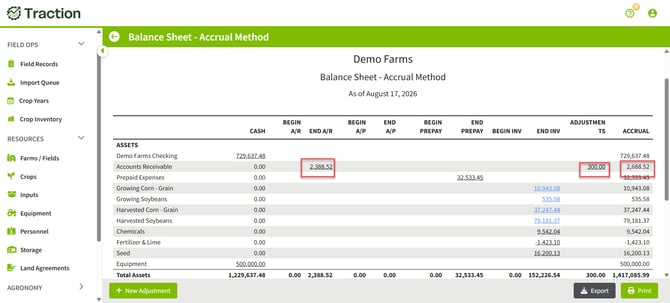
New Accrual Total of $2,688.52 is listed on the Accrual Balance Sheet along with an Adjustment amount of $300.00.
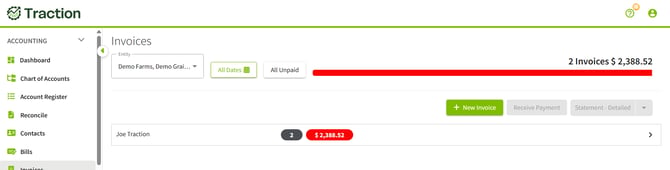
Note: As mentioned, this adjustment is to adjust the Accrual Balance Sheet to keep going but does not correct the underlying issue that caused the amount to be incorrect initially, as demonstrated below; the Invoices do not reflect the adjustment and show the initial $2388.52 amount.
Removing a Correction Once the Underlying Issue Is Fixed
Unlike depreciation, a correction-type adjustment is a stopgap, not something you want left in place. Once you've gone back and fixed the actual source of the problem, for example, fixing the invoice or updating an inventory record, the adjustment is no longer needed, and leaving it in place will double up the correction. At that point, either delete the adjustment or enter a new one that reverses it.
Note: A manual adjustment does not reverse or expire on its own the way beginning and ending Accounts Receivable, Accounts Payable, Prepaid, and Inventory balances do. It stays in place until you remove it or offset it yourself.
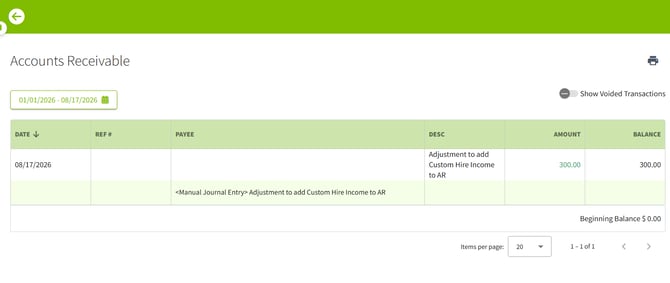
To Void the adjustment, open the Accrual Balance Sheet and click on the underlined value in the Adjustment column. This will open a transaction register; click on the line for the journal entry.
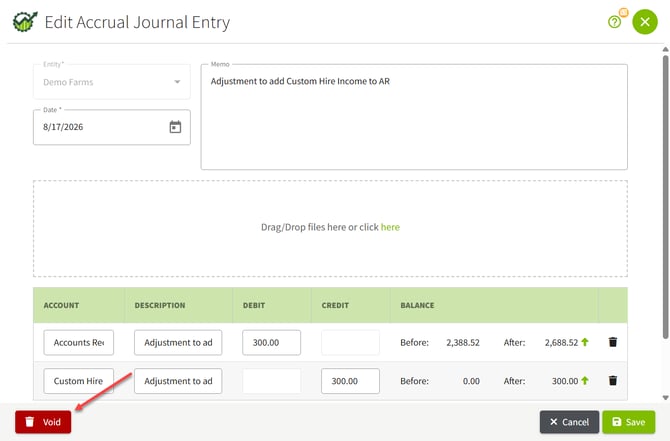
In the lower left corner of the screen will be the Void button.
Frequently Asked Questions
What is the date range for the Income Statement?
The Income Statement always covers the full fiscal year from the first day of the fiscal year (typically January 1) through the As of Date you select. For calendar-year entities, choosing an As of Date of December 31 produces a full-year report. Choosing a mid-year date such as June 30 produces a year-to-date report through that date.
What inventory types are included?
The reports can include Growing Crops, Harvested Crops, and Supplies (such as seed and chemicals). Each can be toggled on or off using the Report Options panel accessed from the gear icon. All three are included by default.
What is the difference between cost of production and Expected Sales Value for harvested crops?
Cost of production is the default unit cost for harvested crop inventory. It is calculated automatically from the Field Profit Center Statement and represents what it actually cost to grow the crop. Expected Sales Value is an alternative that you enter manually in the Harvested Crop Inventory detail view. It is your estimate of what you will ultimately receive when the crop is sold, typically based on contracted prices for bushels already under contract and a current market price for remaining uncontracted bushels. If you have entered a manual value and want to return to the calculated cost of production, use the Reset button in the detail view.
Why does my growing crop inventory unit cost look too low?
The growing crop unit cost comes from the Field Profit Center Statement. If field records are incomplete (for example, if not all inputs, equipment passes, or other costs have been entered), the accumulated cost will be understated. Review the Field Profit Center for the affected fields and crop year to identify missing entries. You can also adjust the unit cost manually in the Growing Crop Inventory detail view, though updating the underlying records is the preferred approach.
Does changing the unit cost on inventory affect my posted transactions?
No. Adjusting the unit cost for harvested crop inventory or growing crop inventory only affects the accrual reports. It does not change any posted transactions, field records, or cash basis data.
Why are beginning values for A/R, A/P, Prepaids, and Inventory showing up on Equity or Retained Earnings accounts on the Balance Sheet?
This is expected behavior. The Retained Earnings account (for corporations) or Owners Equity account (for non-corporations) contains the accumulated cash net income from all years prior to the current report year. Beginning accrual values (beginning A/R, A/P, Prepaids, and Inventory) are assigned to the appropriate equity account rather than being left as unexplained adjustments. This means the equity accounts effectively reflect the prior years' accrual net income, keeping the Balance Sheet in balance while properly representing the farm's accumulated financial position on an accrual basis.