![Type=Full, Color=Light, Lockup=Default@2x.png]](https://info.tractionag.com/hs-fs/hubfs/Type=Full%2c%20Color=Light%2c%20Lockup=Default@2x.png?height=32&name=Type=Full%2c%20Color=Light%2c%20Lockup=Default@2x.png)
You must have a minimum subscription of Plus in order to use this feature. Visit our Plans and Pricing page to learn more.
This transaction will reduce your inventory and update the average price used on Field Profit Centers and will show the net sales (Total sale less discounts) as Revenue on your Cash Income statement and Schedule F
Step 1: Record the Advance Payment (Deposit)
When you receive and deposit the advance payment:
- Go to the Account Register
- Select Add New → Deposit
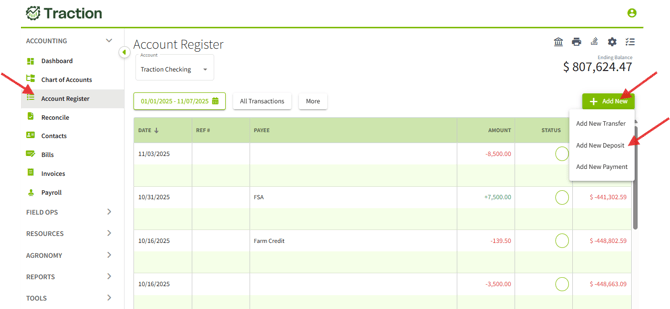
- Select the company that paid the advance
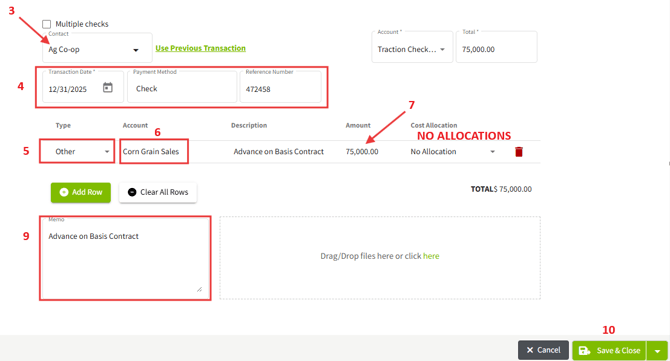
- Enter the date and (if applicable) a reference number
- Select Other for the Type
- Select the revenue account for the crop related to the advance
- Enter the advance amount
- Do NOT allocate the amount
- Enter a Memo and Description (example: Advance on Basis Contract)
- Select Save and Close
Result
- The advance payment is recorded as revenue
- It appears on the Cash Income Statement and Schedule F
Step 2: Record the Final Settlement
When the grain is settled and you receive the remaining payment:
- Go to the Account Register
- Select Add New → Deposit
- Select the company that paid the advance
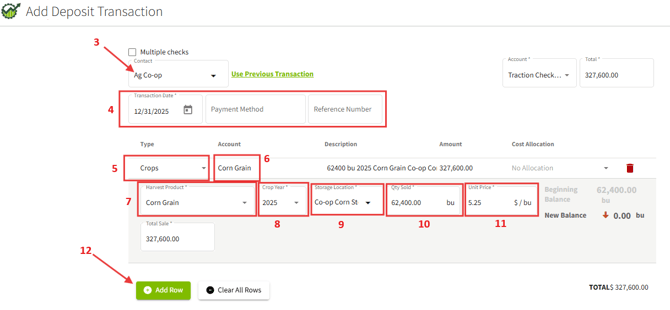
- Enter the date and (if applicable) a reference number
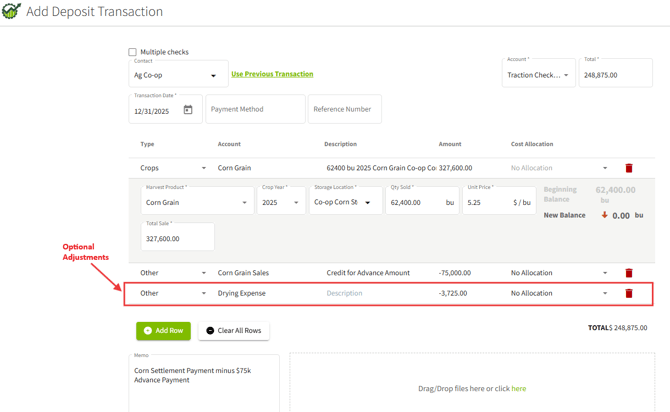
- Select Crops for the Type
- Select the Account
- Select the Harvest Product
- Select the Crop Year
- Select the Storage Location
- Enter the TOTAL quantity sold
- Enter the unit price or total sale amount
(This should be the gross sale amount before basis advances.) - Select Add Row
- Select Other for the Type
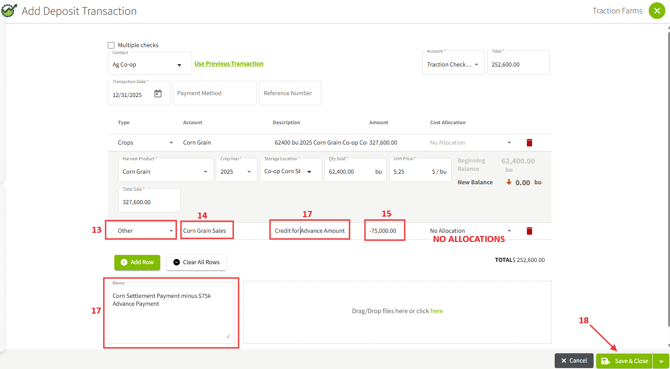
- Select the same revenue account used for the advance
- Enter the advance amount as a NEGATIVE value
- Do NOT allocate the amount
- Enter a Memo and Description (example: Corn Settlement minus $75,000 Advance Payment)
Optional Adjustments
- For additional reductions (e.g., drying, shrink, discounts):
- Select Add Row
- Choose the appropriate expense account
- Enter the amount as a negative value
- Select Add Row
- Confirm the Total Deposit matches the amount paid
18. Select Save and Close
What This Process Does
- Reduces crop inventory
- Updates the average price used in Field Profit Centers
- Reports net crop sales (gross sale minus advances and adjustments) as revenue on:
- Cash Income Statement
- Schedule F
- Cash Income Statement